
M i c h a e l W e s l e y
A r t i s t T w o
A R T I S T C O N T E X T :
 |
|---|
Michael Wesley is the artist behind the series of images below. Born in 1963, Wesley is a German photographer who captures extremely long exposure of architecture and many other interesting items. Using techniques such as long exposure, Michael Wesley explores the concept of time through his work. I have selected Wesley as my second artist as I will be exploring his images of Architecture shown below. Similar to Idris Khan, Michael Wesley also explores the identity of places through the concept of time but in a different way. Although these artists are similar, Wesley explores the identity of places through the physical changes that occur in different places over time and how those changes may impacts our perspectives on those places. He does this by using special pin-hole cameras to capture his images. The shutters of his cameras remain open for long periods of time (sometimes 2-3 years) to capture the change in the area. Wesley places his cameras in the streets and sometimes installs them in hard to reach places in buildings (to prevent his cameras from being stolen) near active construction sites to capture the entire construction process in one image. I think this concept of places physically changing over time and how it may impact our personal perceptions as well as the places itself is really interesting. I also find the several ways that his work could be perceived as quite fascinating as it allows each viewer to have a personalised view of his work. I believe that the identity of places is so underrated and under acknowledged as we don’t usually associate places with our identities and fail to realise how big an impact certain places have on our lives and how they mould us into who we are in the present.
 |  |  |
|---|---|---|
 |  |
A R T I S T A N A L Y S I S :

Although these artists are similar, Wesley explores the identity of places through the physical changes that occur in different places over time and how those changes may impact our perspectives on those places. He does this by using special pin-hole cameras to capture his images. The shutters of his cameras remain open for long periods of time (sometimes 2-3 years) to capture the change in the area. Wesley places his cameras in the streets and sometimes installs them in hard-to-reach places in buildings (to prevent his cameras from being stolen) near active construction sites to capture the entire construction process in one image. I think this concept of places physically changing over time and how it may impact our personal perceptions as well as the places themselves is really interesting. I also find the several ways that his work could be perceived as quite fascinating as it allows each viewer to have a personalized view of his work. I believe that the identity of places is so underrated and under-acknowledged as we don’t usually associate places with our identities and fail to realize how big an impact certain places have on our lives and how they mould us into who we are in the present. This image is a long exposure of the construction of a building. By looking at the image, I can see the entire building process and how the structure above gradually went from nothing to a tall building. In my opinion, this image could represent many things which I will explain below. My first interpretation of this image was how we change and develop over time and how this piece could be symbolic of that change. For example, as humans, when we are born we are much different to the way we are now, as we gather more knowledge and experiences and we are influenced by the environment and people around us which form who we are as individuals today. Similarly, the empty area before construction could symbolize how we are “blank canvases” when we are born and how our parents and the people around us, which would be the builders, in this case, mould and build us into who we are, just like the builders construct buildings. My second interpretation focuses less on our age and more on the buildings themselves and how they impact us. An example of this change would be how our perspectives of an area change when a building is reconstructed. For example, when a building we were raised in or had memories in is transformed into another building, our memories of the previous structure remain, but our perspectives of the area inevitably change despite our memories as we get more used to the new building. However, over time our memories become less and less accurate and our past identities fade away with our memories, causing us to gradually change and our past identities to disappear with the building as it is no longer there to impact us. Although these are my interpretations of this image, they are personalised and another individual will interpret this image much differently, which makes Wesley’s work even more interesting.
P H O T O S H O O T P L A N :
 |
|---|
C O N T A C T S H E E T :
 |  |  |
|---|---|---|
 |  |  |
 |  |
My intention for this photoshoot was to capture several images in the style of photographer Michael Wesley. I did this by traveling to Holland Park Station at 09:30 am on Saturday by bus 94 and continuously walking around the area in search of construction sites and interesting buildings. When finding a construction site or interesting building, I photographed it with a Canon Powershot SX540 camera whilst walking around it and tilting my camera slightly upwards and downwards to vary my camera angle and to produce a wide variety of different images to use when editing. I also attempted to capture construction sites that corresponded with the buildings I photographed. I believe that the successful elements of this shoot were the wide variety of different buildings and construction captured and the multiple images taken of each of them. I am also very content as I was able to find several construction sites to photograph so that I have a wide variety of images to choose from when I am editing my images. On the other hand, I believe that an element of this photoshoot that could be improved is the similarity between the construction sites and the buildings I photographed. I could improve this by navigating around the area more or visiting a different area with a wider variety of buildings that I can photograph. In conclusion, I really enjoyed capturing these images and exploring the nearby area, the journey was enjoyable and I am content with the photographs captured and I believe that I have all the shots required to edit these images.
P R O C E S S L O G :

S T E P 1 ) I opened two images by clicking 'file' and then 'open'. I selected one image of a construction site and then the other of a building that I think would correspond to the image of the construction site.
S T E P 2 ) I copied my chosen image of a construction site that I photographed and used the 'rectangular marquee tool' to select it and clicked 'ctrl + c' to copy it so that I can paste it onto the other image of my chosen building.


S T E P 3 ) I then pasted my image of a construction site over my image of a building by clicking 'ctrl + v'. I then adjusted the size of my image by clicking 'crtl + t' and then scaling it using my cursor.
S T E P 4 ) After doing this, I clicked 'normal' and experimented with different double-exposure effects to match the work of Michael Wesley. I ended up using the 'screen' effect for most of my images as I thought it was the most suitable and matched the work of my artist best.


S T E P 5 ) I then made my image black and white, by clicking on the 'black & white tool' to match the style of Michael Wesley as his images are also in black and white.
S T E P 6 ) After making my image black and white, I then added a filter to my image by clicking 'colour lookup' and then selecting a filter that I think suits my image. For this specific image, I used the 'DropBlues.3DL' filter.


S T E P 7 ) After adding a filter to my image, I then adjusted the brightness and contrast of my image using the 'Brightness /Contrast tool' and adjusting them to suit my image and make it look more similar to the work of Michael Wesley. I then saved my image by clicking 'file' and then 'save as'.
D E V E L O P M E N T S :
 |  |  |
|---|---|---|
 |  |  |
 |  |  |
 |  |  |
 |  |  |
 |  |  |
 |  |  |
 |  |  |
 |  |  |
 |  |  |
 |  |  |
 |  |  |
 |  |  |
 |  |  |
 |  |  |
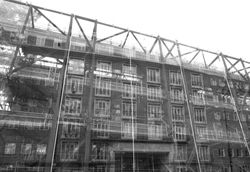
I think my images suit the artist that I am working on because the style of my images appears inspired by photographer Michael Wesley. I have done this by taking images of construction sides and buildings from different angles using different compositions and using a Canon Powershot SX540hz camera. To edit my photographs, I opened two images by clicking 'file' and then 'open'. I selected a photograph of a building site and then the other of a building that I photographed. After, I copied the image I chose of a construction site and used the 'rectangular marquee tool' to select it and then I clicked 'ctrl + c' to copy it so that I can paste it onto the other image. Next, I then pasted my image of a construction site over my other image by clicking 'ctrl + v', and then adjusted the size of my image by clicking 'crtl + t'. After doing this, I clicked 'normal' and experimented with different double-exposure effects to match my work. After this, I then made my image black and white, by using the 'black & white tool' to match the style of Michael Wesley as his images also use a black and white filter. I then added a filter to my image by clicking 'colour lookup' and then selecting a filter to suit my image. After adding a filter, I then used the 'Brightness /Contrast tool' to adjust the contrast and brightness of my image. Overall, I am very pleased with my developments and I think they look inspired by the work of Michael Wesley.
F U R T H E R D E V E L O P M E N T S :
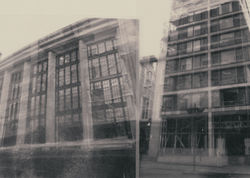
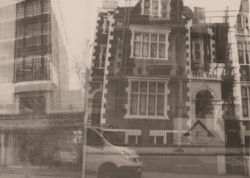
For my further developments, I decided to experiment with different compositions with my previous photographs. I did this by opening three images that I thought would look interesting beside each other, I clicked ‘file’, ‘open’ then selected my chosen images and opened them to do this. After opening my images, I used the ‘crop tool’ to expand my canvas to fit two other images, one on the left and one on the right side of my image. After expanding my canvas, I copied my other images by selecting them using the ‘rectangular marquee tool’ and then clicking ‘ctrl + c’ to copy my images and ‘ctrl + v’ to paste them onto my expanded canvas. After copying and pasting both of my images I then clicked ‘ctrl + t’ to adjust the size of my images and to scale them accordingly. After scaling my images, I then cropped my canvas to get rid of any extra space that may have remained using the 'crop tool' and then clicked ‘file’ and then ‘save as’ to save my images. In conclusion, I really enjoyed exploring the composition of my images and I am extremely pleased with the outcomes.
C O N T A C T S H E E T :
 |  |
|---|---|
 |  |
 |  |
My intention for my redrafted photoshoot was to try and learn from my previous mistakes and produce images that appear more similar to the work of Michael Wesley than my previous photoshoot. This time, I took bus 207 to Westfield, Shepherds Bush, and then walked to the back of the buildings to photograph the construction sites and buildings that
were in progress in the area. I left my house again at approximately 9:30 am. After capturing some interesting buildings and construction sites in that area, I took bus 316 to Hammersmith where I photographed many other interesting buildings and construction sites. From Hammersmith, I walked through High Street
Kensington until I arrived at Holland Park station. Throughout my journey, I found many attractive construction sites and buildings and I managed to find construction sites and buildings that correspond with each other like I was hoping to do in my previous photoshoot. I captured my images from an eye-level/low angle and I navigated around each building and construction site to capture many different parts of each area. I captured my images using a Canon Powershot SX540 camera. Two successful elements of my work would be the wider variety of images and the larger quantity of construction sites I discovered whilst taking my images. However, an element of my work that could be improved would be the aperture of my images, as the natural lighting during the day has caused some of my images to be too bright. Overall, I thoroughly enjoyed capturing these images and exploring Hammersmith and I believe that I have all the images I require to begin editing my images.
D E V E L O P M E N T S :
 |  |  |
|---|---|---|
 |  |  |
 |  |  |
 |  |  |
 |  |  |
 |  |  |
 |  |  |
 |  |  |
 |  |  |
 |  |  |
P R O C E S S L O G & A N N O T A T I O N :
 |  |
|---|---|
 |  |
 |  |
For my redraft, I used a similar technique to create even more developments in the style of Michael Wesley. I used the editing software 'Photoshop'. I did this by firstly opening two of my images (one of a construction site and one of a building with a similar shape) by clicking 'file' and 'open'. After this, I copied the image of the construction site by using the 'rectangular marquee tool' and clicking 'ctrl + c' to copy. I then opened up my image of the building and clicking 'ctrl + v' to paste the image of the construction site on top. After doing this, I added a layer of black and white to both of my images (in order to match the style of Michael Wesley) using the 'black & white tool'. After doing this, I needed to select a double-exposure technique. I did this by going to the bottom right side of my screen and clicking 'normal' and then selecting a double-exposure technique. For this particular set of developments, I used 'screen' and 'multiply' as they were the techniques that best suited the style of my artist. After doing this, I used a filter to make my image even more like the work of Michael Wesley. For these developments I mostly used the 'DropBlues.3DL' filter to make my images look even more interesting. After doing this, I used the 'Brightness/Contrast' tool to adjust the brightness and contrast within my image. I did this to make my images even more like the style of Michael Wesley. After this, I drew with the 'burn tool' to bring out any shadows or details I wanted to make clear within my image. Finally, I saved my images by clicking 'ctrl + s' and then changing my images from photoshop files to 'JPEG' files. A successful element for this set of developments I would say is the similarity (of shape and size) between the construction sites and buildings in some of my developments. An element of my work that I could improve is selecting images taken from similar angles for some of my developments as if images taken from two very different angles are used, the images will look quite random. Overall, I really enjoyed editing these developments and I think that the images I captured for this photoshoot worked very well in most cases.
F U R T H E R D E V E L O P M E N T S - M I R R O R I N G:
 |  |  |
|---|---|---|
 |  |  |
 |  |  |
 |  |  |
 |  |  |
 |  |  |
 |  |  |
 |  |  |
 |  |  |
 |  |  |
type
E X P E R I M E N T I N G W I T H T R A C I N G P A P E R :
 |  |  |
|---|---|---|
 |  |
type
D E V E L O P M E N T S :
 |  |  |
|---|---|---|
 |  |  |
 |  |  |
 |  |  |
 |  |  |
 |  |  |
 |  |  |
 |  |  |
 |  |  |
 |  |  |
type
F U R T H E R D E V E L O P M E N T S :
 |  |  |
|---|---|---|
 |  |  |
 |  |  |
 |  |  |
 |  |  |
 |  |  |
 |  |  |
 |  |  |
 |  |  |
 |  |  |
type
E X P E R I M E N T I N G W I T H
I N K & W A T E R
type
D E V E L O P M E N T S :
type
 |  |  |
|---|---|---|
 |  |  |
p r o c e s s l o g & a n n o t a t i o n :
| | |
|---|---|---|
| | |
p r o c e s s l o g & a n n o t a t i o n :
 |  |  |
|---|---|---|
 |  |  |
 |  |  |
 |  |  |
 |  |  |
 |  |  |
 |  |
 |  |  |
|---|---|---|
 |  |  |
 |  |  |
 |  |  |
 |  |  |
 |  |  |
 |  |  |
 |  |  |
 |
A R T I S T C O N T E X T :
|
|---|
Michael Wesley is the artist behind the series of images below. Born in 1963, Wesley is a German photographer who captures extremely long exposure of architecture and many other interesting items. Using techniques such as long exposure, Michael Wesley explores the concept of time through his work. I have selected Wesley as my second artist as I will be exploring his images of Architecture shown below. Similar to Idris Khan, Michael Wesley also explores the identity of places through the concept of time but in a different way.
| | |
|---|---|---|
| |
A R T I S T A N A L Y S I S :
Although these artists are similar, Wesley explores the identity of places through the physical changes that occur in different places over time and how those changes may impact our perspectives on those places. He does this by using special pin-hole cameras to capture his images. The shutters of his cameras remain open for long periods of time (sometimes 2-3 years) to capture the change in the area. Wesley places his cameras in the streets and sometimes installs them in hard-to-reach places in buildings (to prevent his cameras from being stolen) near active construction sites to capture the entire construction process in one image. I think this concept of places physically changing over time and how it may impact our personal perceptions as well as the places themselves is really interesting. I also find the several ways that his work could be perceived as quite fascinating as it allows each viewer to have a personalized view of his work. I believe that the identity of places is so underrated and under-acknowledged as we don’t usually associate places with our identities and fail to realize how big an impact certain places have on our lives and how they mould us into who we are in the present. This image is a long exposure of the construction of a building. By looking at the image, I can see the entire building process and how the structure above gradually went from nothing to a tall building. In my opinion, this image could represent many things which I will explain below. My first interpretation of this image was how we change and develop over time and how this piece could be symbolic of that change. For example, as humans, when we are born we are much different to the way we are now, as we gather more knowledge and experiences and we are influenced by the environment and people around us which form who we are as individuals today. Similarly, the empty area before construction could symbolize how we are “blank canvases” when we are born and how our parents and the people around us, which would be the builders, in this case, mould and build us into who we are, just like the builders construct buildings. My second interpretation focuses less on our age and more on the buildings themselves and how they impact us. An example of this change would be how our perspectives of an area change when a building is reconstructed. For example, when a building we were raised in or had memories in is transformed into another building, our memories of the previous structure remain, but our perspectives of the area inevitably change despite our memories as we get more used to the new building. However, over time our memories become less and less accurate and our past identities fade away with our memories, causing us to gradually change and our past identities to disappear with the building as it is no longer there to impact us. Although these are my interpretations of this image, they are personalised and another individual will interpret this image much differently, which makes Wesley’s work even more interesting.
P H O T O S H O O T P L A N :
|
|---|
C O N T A C T S H E E T :
| | |
|---|---|---|
| | |
| |
My intention for this photoshoot was to capture several images in the style of photographer Michael Wesley. I did this by traveling to Holland Park Station at 09:30 am on Saturday by bus 94 and continuously walking around the area in search of construction sites and interesting buildings. When finding a construction site or interesting building, I photographed it with a Canon Powershot SX540 camera whilst walking around it and tilting my camera slightly upwards and downwards to vary my camera angle and to produce a wide variety of different images to use when editing. I also attempted to capture construction sites that corresponded with the buildings I photographed. I believe that the successful elements of this shoot were the wide variety of different buildings and construction captured and the multiple images taken of each of them. I am also very content as I was able to find several construction sites to photograph so that I have a wide variety of images to choose from when I am editing my images. On the other hand, I believe that an element of this photoshoot that could be improved is the similarity between the construction sites and the buildings I photographed. I could improve this by navigating around the area more or visiting a different area with a wider variety of buildings that I can photograph. In conclusion, I really enjoyed capturing these images and exploring the nearby area, the journey was enjoyable and I am content with the photographs captured and I believe that I have all the shots required to edit these images.
P R O C E S S L O G :
S T E P 1 ) I opened two images by clicking 'file' and then 'open'. I selected one image of a construction site and then the other of a building that I think would correspond to the image of the construction site.
S T E P 2 ) I copied my chosen image of a construction site that I photographed and used the 'rectangular marquee tool' to select it and clicked 'ctrl + c' to copy it so that I can paste it onto the other image of my chosen building.
S T E P 3 ) I then pasted my image of a construction site over my image of a building by clicking 'ctrl + v'. I then adjusted the size of my image by clicking 'crtl + t' and then scaling it using my cursor.
S T E P 4 ) After doing this, I clicked 'normal' and experimented with different double-exposure effects to match the work of Michael Wesley. I ended up using the 'screen' effect for most of my images as I thought it was the most suitable and matched the work of my artist best.
S T E P 5 ) I then made my image black and white, by clicking on the 'black & white tool' to match the style of Michael Wesley as his images are also in black and white.
S T E P 6 ) After making my image black and white, I then added a filter to my image by clicking 'colour lookup' and then selecting a filter that I think suits my image. For this specific image, I used the 'DropBlues.3DL' filter.
S T E P 7 ) After adding a filter to my image, I then adjusted the brightness and contrast of my image using the 'Brightness /Contrast tool' and adjusting them to suit my image and make it look more similar to the work of Michael Wesley. I then saved my image by clicking 'file' and then 'save as'.
D E V E L O P M E N T S :
| | |
|---|---|---|
| | |
| | |
| | |
| | |
| | |
| | |
| | |
| | |
| | |
| | |
| | |
| | |
| | |
| | |
I think my images suit the artist that I am working on because the style of my images appears inspired by photographer Michael Wesley. I have done this by taking images of construction sides and buildings from different angles using different compositions and using a Canon Powershot SX540hz camera. To edit my photographs, I opened two images by clicking 'file' and then 'open'. I selected a photograph of a building site and then the other of a building that I photographed. After, I copied the image I chose of a construction site and used the 'rectangular marquee tool' to select it and then I clicked 'ctrl + c' to copy it so that I can paste it onto the other image. Next, I then pasted my image of a construction site over my other image by clicking 'ctrl + v', and then adjusted the size of my image by clicking 'crtl + t'. After doing this, I clicked 'normal' and experimented with different double-exposure effects to match my work. After this, I then made my image black and white, by using the 'black & white tool' to match the style of Michael Wesley as his images also use a black and white filter. I then added a filter to my image by clicking 'colour lookup' and then selecting a filter to suit my image. After adding a filter, I then used the 'Brightness /Contrast tool' to adjust the contrast and brightness of my image. Overall, I am very pleased with my developments and I think they look inspired by the work of Michael Wesley.
F U R T H E R D E V E L O P M E N T S :
For my further developments, I decided to experiment with different compositions with my previous photographs. I did this by opening three images that I thought would look interesting beside each other, I clicked ‘file’, ‘open’ then selected my chosen images and opened them to do this. After opening my images, I used the ‘crop tool’ to expand my canvas to fit two other images, one on the left and one on the right side of my image. After expanding my canvas, I copied my other images by selecting them using the ‘rectangular marquee tool’ and then clicking ‘ctrl + c’ to copy my images and ‘ctrl + v’ to paste them onto my expanded canvas. After copying and pasting both of my images I then clicked ‘ctrl + t’ to adjust the size of my images and to scale them accordingly. After scaling my images, I then cropped my canvas to get rid of any extra space that may have remained using the 'crop tool' and then clicked ‘file’ and then ‘save as’ to save my images. In conclusion, I really enjoyed exploring the composition of my images and I am extremely pleased with the outcomes.
C O N T A C T S H E E T :
| |
|---|---|
| |
| |
My intention for my redrafted photoshoot was to try and learn from my previous mistakes and produce images that appear more similar to the work of Michael Wesley than my previous photoshoot. This time, I took bus 207 to Westfield, Shepherds Bush, and then walked to the back of the buildings to photograph the construction sites and buildings that
were in progress in the area. I left my house again at approximately 9:30 am. After capturing some interesting buildings and construction sites in that area, I took bus 316 to Hammersmith where I photographed many other interesting buildings and construction sites. From Hammersmith, I walked through High Street
Kensington until I arrived at Holland Park station. Throughout my journey, I found many attractive construction sites and buildings and I managed to find construction sites and buildings that correspond with each other like I was hoping to do in my previous photoshoot. I captured my images from an eye-level/low angle and I navigated around each building and construction site to capture many different parts of each area. I captured my images using a Canon Powershot SX540 camera. Two successful elements of my work would be the wider variety of images and the larger quantity of construction sites I discovered whilst taking my images. However, an element of my work that could be improved would be the aperture of my images, as the natural lighting during the day has caused some of my images to be too bright. Overall, I thoroughly enjoyed capturing these images and exploring Hammersmith and I believe that I have all the images I require to begin editing my images.
D E V E L O P M E N T S :
| | |
|---|---|---|
| | |
| | |
| | |
| | |
| | |
| | |
| | |
| | |
| | |
P R O C E S S L O G & A N N O T A T I O N :
| |
|---|---|
| |
| |
For my redraft, I used a similar technique to create even more developments in the style of Michael Wesley. I used the editing software 'Photoshop'. I did this by firstly opening two of my images (one of a construction site and one of a building with a similar shape) by clicking 'file' and 'open'. After this, I copied the image of the construction site by using the 'rectangular marquee tool' and clicking 'ctrl + c' to copy. I then opened up my image of the building and clicking 'ctrl + v' to paste the image of the construction site on top. After doing this, I added a layer of black and white to both of my images (in order to match the style of Michael Wesley) using the 'black & white tool'. After doing this, I needed to select a double-exposure technique. I did this by going to the bottom right side of my screen and clicking 'normal' and then selecting a double-exposure technique. For this particular set of developments, I used 'screen' and 'multiply' as they were the techniques that best suited the style of my artist. After doing this, I used a filter to make my image even more like the work of Michael Wesley. For these developments I mostly used the 'DropBlues.3DL' filter to make my images look even more interesting. After doing this, I used the 'Brightness/Contrast' tool to adjust the brightness and contrast within my image. I did this to make my images even more like the style of Michael Wesley. After this, I drew with the 'burn tool' to bring out any shadows or details I wanted to make clear within my image. Finally, I saved my images by clicking 'ctrl + s' and then changing my images from photoshop files to 'JPEG' files. A successful element for this set of developments I would say is the similarity (of shape and size) between the construction sites and buildings in some of my developments. An element of my work that I could improve is selecting images taken from similar angles for some of my developments as if images taken from two very different angles are used, the images will look quite random. Overall, I really enjoyed editing these developments and I think that the images I captured for this photoshoot worked very well in most cases.
F U R T H E R D E V E L O P M E N T S - M I R R O R I N G:
| | |
|---|---|---|
| | |
| | |
| | |
| | |
| | |
| | |
| | |
| | |
| | |
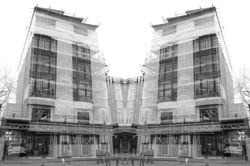
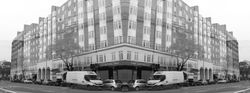
For this set of developments, I further developed my images but mirroring them. I used the editing software 'Photoshop' to create these developments. Firstly, I began by opening my previous developments (from my redrafted photoshoot) by clicking 'file' and 'open' and selecting the image I want to mirror. I then needed to copy my image so that I can mirror it, which I did by using the 'rectangular marquee tool' to select my image. After this, I copied my image by clicking 'ctrl + c' then immediately pasted it afterwards by clicking 'ctrl + v'. After this, I needed to expand my canvas so that I could mirror my image, which I did by using the 'crop tool' and pulling the image from the side I want to mirror in order to make the canvas double its size (in terms of width). After this, I selected my copied image (making sure I was on the right layer) by clicking 'ctrl + t' and moved it into the empty space beside my developments. To mirror the copied image, I then left clicked the image and clicking the 'flip horizontal' button which flipped my image, creating an interesting mirroring effect of my image. I then drew with the 'burn tool' to accentuate any shadows or details within my image. Finally, I saved my image by clicking 'ctrl + s' (or 'file', 'save as') to save. A successful element of this work would have to be how interesting the mirroring effect looks. An element of this work that I would improve would have to be the size of my image. To improve this, I would use the 'crop tool' to make my image smaller in width. Overall, I really like the outcome of these images and I believe that the mirroring technique worked really well with this set of developments.
P R O C E S S L O G & A N N O T A T I O N :
| |
|---|---|
| |
| |
E X P E R I M E N T I N G W I T H T R A C I N G P A P E R :
| | |
|---|---|---|
| |
type
D E V E L O P M E N T S :
| | |
|---|---|---|
| | |
| | |
| | |
| | |
| | |
| | |
| | |
| | |
| | |
type
P R O C E S S L O G & A N N O T A T I O N :
| |
|---|---|
| |
| |
F U R T H E R D E V E L O P M E N T S :
| | |
|---|---|---|
| | |
| | |
| | |
| | |
| | |
| | |
| | |
| | |
| | |
type
E X P E R I M E N T I N G W I T H
I N K & W A T E R
 |  |  |
|---|---|---|
 |  |
type
D E V E L O P M E N T S :
 |  |  |
|---|---|---|
 |  |  |
 |  |  |
 |  |  |
 |  |  |
 |  |  |
 |  |  |
 |  |  |
 |  |  |
 |  |  |
 |  |  |
 |  |  |
 |  |  |
type
P R O C E S S L O G & A N N O T A T I O N :
| |
|---|---|
| |
| |
A R T I S T C O N T E X T :
|
|---|
Michael Wesley is the artist behind the series of images below. Born in 1963, Wesley is a German photographer who captures extremely long exposure of architecture and many other interesting items. Using techniques such as long exposure, Michael Wesley explores the concept of time through his work. I have selected Wesley as my second artist as I will be exploring his images of Architecture shown below. Similar to Idris Khan, Michael Wesley also explores the identity of places through the concept of time but in a different way. Although these artists are similar, Wesley explores the identity of places through the physical changes that
| | |
|---|---|---|
| |
occur in different places over time and how those changes may impacts our perspectives on those places. He does this by using special pin-hole cameras to capture his images. The shutters of his cameras remain open for long periods of time (sometimes 2-3 years) to capture the change in the area. Wesley places his cameras in the streets and sometimes installs them in hard to reach places in buildings (to prevent his cameras from being stolen) near active construction sites to capture the entire construction process in one image. I think this concept of places physically changing over time and how it may impact our personal perceptions as well as the places itself is really interesting. I also find the several ways that his work could be perceived as quite fascinating as it allows each viewer to have a personalised view of his work. I believe that the identity of places is so underrated and under acknowledged as we don’t usually associate places with our identities and fail to realise how big an impact certain places have on our lives and how they mould us into who we are in the present.
A R T I S T A N A L Y S I S :
This image is a long exposure of the construction of a building. By looking at the image, I can see the entire building process and how the structure above gradually went from nothing to a tall building. In my opinion this image could represent many things which I will explain below. My first interpretation of this image was how we change and develop over time and how this piece could be symbolic of that change. For example, as humans, when we are born we are much different to the way we are now, as we gather more knowledge and experiences and we are influenced by the environment and people around us which form who we are as individuals today. Similarly, the empty area before construction could symbolise how we are “blank canvases” when we are born and how our parents and the people around us, which would be the builders in this case, mould and build us into who we are, just like the builders construct buildings. My second interpretation focuses less on our age and more on the buildings themselves and how they impact us. An example of this change would be how our perspectives of an area change when a building is reconstructed. For example, when a building we were raised in or had memories in is transformed into another building, our memories of the previous structure remain, but our perspectives of the area inevitably change despite our memories as we get more used to the new building. However, over time our memories become less and less accurate and our past identities fade away with our memories, causing us to gradually change and our past identities to disappear with the building as it is no longer there to impact us. Although these are my interpretations of this image, they are personalised and another individual will interpret this image much differently, which makes Wesley’s work even more interesting. I would say that the themes of this work are landscape, moment, memory and message as Wesley’s images are captured landscape and his work portrays the change that buildings undergo over a long period of time, capturing each moment every day for several months and years and merging the progress with memories of the building’s previous appearance, carrying the message that no matter how much change a place undergoes, it’s previous appearance will continue to live on in the minds of those who hold memories there. This specific image is called ‘Potsdamer Platz 1979 – 1999’. Potsdamer Platz is located in Berlin (the capital of Germany) which has undergone massive change to now look like this today:
Michael Wesley uses black and white imagery within his work to allow the viewer to create their own colours of the image in their minds. This black and white imagery could also be used to convey the opinion that change is a negative process that destroys the memories of people who once cared for that specific place. Not only this, but the black and white in Wesley’s work could also be used to convey the message of change, by telling the viewer that the image was captured years ago, and that it looked that way in the past. This message is conveyed because we usually associate black and white images with the past as they are quite faded and the lack of colour makes it seem forgotten. I would say that the black and white gives Wesley’s work an element of harsh realism, as it carries the message that this was its previous state and that it’s been destroyed and will never return, giving his work an element of melancholy behind it. I find it fascinating that we can see years of change that the buildings undergo within a single image, which is what inspired me to try and recreate Wesley’s work. I can see the patterns of the building’s previous appearance slightly faded in the background, due to the extremely long exposure which captured the building in its previous state and merged it with its current state.
In terms of the process, Wesley captured this image by hanging a pinhole camera from a high building beside an area that was going to undergo construction (specifically Potsdamer Platz in this image), angling it towards a specific building, and then leaving it for a few years (2 years for this specific image (1979-1999) until the building is done being reconstructed. This is evident as the entire two year process has been captured in this one image. However, as I cannot leave my camera for such a long time period, I will attempt to recreate the work of Michael Wesley using my own personal technique to make my work individualistic.
Looking at the mood of this work, I would say it communicates a feeling of inevitable melancholy. Change is an inevitable process that every since thing undergoes whether we like it or not. We cannot stop change or pause time, we can only look at the process as it takes place and try to accept it. Just like we can’t stop age, we cannot stop the change that buildings go through over time. What makes this change melancholic is the fact that these places will never be the same again and all our memories of them will be inevitably destroyed along with the structure itself. I think the way that Michael Wesley admires change via his work is what makes it beautifully heartbreaking and so interesting to look at (due to its hyper realistic concept). Wesley’s use of black and white imagery also adds to this idea of melancholy as black and white has connotations of death (the death of the building's previous forms in this instance), the past (as it is time and moments we will never get back or be able to relive and experience once again). I also believe that black and white has connotations of clarity, which links to this notion of a harsh and inevitable reality of change within Michael Wesley’s work. I would also say his work makes us contemplative of our memories and actions in certain places and allows us to come to our senses and appreciate the settings of important events.
Looking at the meaning behind the work, I would say that Michael Wesley is trying to help us realise that the things around us matter too, and that we shouldn’t leave them unacknowledged until it is too late to admire them and they become a fragment of our memories and part of the past. I personally feel so connected to Wesley's work and I believe his work holds a very essential and genuine concept. I relate to his work both emotionally and physically and I think the fact that everyone can as well is what makes his work so effective as it relates to the viewer's personal experiences and thoughts.

P H O T O S H O O T P L A N :
|
|---|
C O N T A C T S H E E T :
| | |
|---|---|---|
| | |
| |
My intention for this photoshoot was to capture several images in the style of photographer Michael Wesley. I did this by traveling to Holland Park Station at 09:30 am on Saturday by bus 94 and continuously walking around the area in search of construction sites and interesting buildings. When finding a construction site or interesting building, I photographed it with a Canon Powershot SX540 camera whilst walking around it and tilting my camera slightly upwards and downwards to vary my camera angle and to produce a wide variety of different images to use when editing. I also attempted to capture construction sites that corresponded with the buildings I photographed. I believe that the successful elements of this shoot were the wide variety of different buildings and construction captured and the multiple images taken of each of them. I am also very content as I was able to find several construction sites to photograph so that I have a wide variety of images to choose from when I am editing my images. On the other hand, I believe that an element of this photoshoot that could be improved is the similarity between the construction sites and the buildings I photographed. I could improve this by navigating around the area more or visiting a different area with a wider variety of buildings that I can photograph. In conclusion, I really enjoyed capturing these images and exploring the nearby area, the journey was enjoyable and I am content with the photographs captured and I believe that I have all the shots required to edit these images.
P R O C E S S L O G :
S T E P 1 ) I opened two images by clicking 'file' and then 'open'. I selected one image of a construction site and then the other of a building that I think would correspond to the image of the construction site.
S T E P 2 ) I copied my chosen image of a construction site that I photographed and used the 'rectangular marquee tool' to select it and clicked 'ctrl + c' to copy it so that I can paste it onto the other image of my chosen building.
S T E P 3 ) I then pasted my image of a construction site over my image of a building by clicking 'ctrl + v'. I then adjusted the size of my image by clicking 'crtl + t' and then scaling it using my cursor.
S T E P 4 ) After doing this, I clicked 'normal' and experimented with different double-exposure effects to match the work of Michael Wesley. I ended up using the 'screen' effect for most of my images as I thought it was the most suitable and matched the work of my artist best.
S T E P 5 ) I then made my image black and white, by clicking on the 'black & white tool' to match the style of Michael Wesley as his images are also in black and white.
S T E P 6 ) After making my image black and white, I then added a filter to my image by clicking 'colour lookup' and then selecting a filter that I think suits my image. For this specific image, I used the 'DropBlues.3DL' filter.
S T E P 7 ) After adding a filter to my image, I then adjusted the brightness and contrast of my image using the 'Brightness /Contrast tool' and adjusting them to suit my image and make it look more similar to the work of Michael Wesley. I then saved my image by clicking 'file' and then 'save as'.
D E V E L O P M E N T S :
| | |
|---|---|---|
| | |
| | |
| | |
| | |
| | |
| | |
| | |
| | |
| | |
| | |
| | |
| | |
| | |
| | |
I think my images suit the artist that I am working on because the style of my images appears inspired by photographer Michael Wesley. I have done this by taking images of construction sides and buildings from different angles using different compositions and using a Canon Powershot SX540hz camera. To edit my photographs, I opened two images by clicking 'file' and then 'open'. I selected a photograph of a building site and then the other of a building that I photographed. After, I copied the image I chose of a construction site and used the 'rectangular marquee tool' to select it and then I clicked 'ctrl + c' to copy it so that I can paste it onto the other image. Next, I then pasted my image of a construction site over my other image by clicking 'ctrl + v', and then adjusted the size of my image by clicking 'crtl + t'. After doing this, I clicked 'normal' and experimented with different double-exposure effects to match my work. After this, I then made my image black and white, by using the 'black & white tool' to match the style of Michael Wesley as his images also use a black and white filter. I then added a filter to my image by clicking 'colour lookup' and then selecting a filter to suit my image. After adding a filter, I then used the 'Brightness /Contrast tool' to adjust the contrast and brightness of my image. Overall, I am very pleased with my developments and I think they look inspired by the work of Michael Wesley.
F U R T H E R D E V E L O P M E N T S
- c o m p o s i t i o n s :
For my further developments, I decided to experiment with different compositions with my previous photographs. I did this by opening three images that I thought would look interesting beside each other, I clicked ‘file’, ‘open’ then selected my chosen images and opened them to do this. After opening my images, I used the ‘crop tool’ to expand my canvas to fit two other images, one on the left and one on the right side of my image. After expanding my canvas, I copied my other images by selecting them using the ‘rectangular marquee tool’ and then clicking ‘ctrl + c’ to copy my images and ‘ctrl + v’ to paste them onto my expanded canvas. After copying and pasting both of my images I then clicked ‘ctrl + t’ to adjust the size of my images and to scale them accordingly. After scaling my images, I then cropped my canvas to get rid of any extra space that may have remained using the 'crop tool' and then clicked ‘file’ and then ‘save as’ to save my images. In conclusion, I really enjoyed exploring the composition of my images and I am extremely pleased with the outcomes.
C O N T A C T S H E E T :
| |
|---|---|
| |
| |
My intention for my redrafted photoshoot was to try and learn from my previous mistakes and produce images that appear more similar to the work of Michael Wesley than my previous photoshoot. This time, I took bus 207 to Westfield, Shepherds Bush, and then walked to the back of the buildings to photograph the construction sites and buildings that
were in progress in the area. I left my house again at approximately 9:30 am. After capturing some interesting buildings and construction sites in that area, I took bus 316 to Hammersmith where I photographed many other interesting buildings and construction sites. From Hammersmith, I walked through High Street
Kensington until I arrived at Holland Park station. Throughout my journey, I found many attractive construction sites and buildings and I managed to find construction sites and buildings that correspond with each other like I was hoping to do in my previous photoshoot. I captured my images from an eye-level/low angle and I navigated around each building and construction site to capture many different parts of each area. I captured my images using a Canon Powershot SX540 camera. Two successful elements of my work would be the wider variety of images and the larger quantity of construction sites I discovered whilst taking my images. However, an element of my work that could be improved would be the aperture of my images, as the natural lighting during the day has caused some of my images to be too bright. Overall, I thoroughly enjoyed capturing these images and exploring Hammersmith and I believe that I have all the images I require to begin editing my images.
D E V E L O P M E N T S :
| | |
|---|---|---|
| | |
| | |
| | |
| | |
| | |
| | |
| | |
| | |
| | |
P R O C E S S L O G & A N N O T A T I O N :
| |
|---|---|
| |
| |
For my redraft, I used a similar technique to create even more developments in the style of Michael Wesley. I used the editing software 'Photoshop'. I did this by firstly opening two of my images (one of a construction site and one of a building with a similar shape) by clicking 'file' and 'open'. After this, I copied the image of the construction site by using the 'rectangular marquee tool' and clicking 'ctrl + c' to copy. I then opened up my image of the building and clicking 'ctrl + v' to paste the image of the construction site on top. After doing this, I added a layer of black and white to both of my images (in order to match the style of Michael Wesley) using the 'black & white tool'. After doing this, I needed to select a double-exposure technique. I did this by going to the bottom right side of my screen and clicking 'normal' and then selecting a double-exposure technique. For this particular set of developments, I used 'screen' and 'multiply' as they were the techniques that best suited the style of my artist. After doing this, I used a filter to make my image even more like the work of Michael Wesley. For these developments I mostly used the 'DropBlues.3DL' filter to make my images look even more interesting. After doing this, I used the 'Brightness/Contrast' tool to adjust the brightness and contrast within my image. I did this to make my images even more like the style of Michael Wesley. After this, I drew with the 'burn tool' to bring out any shadows or details I wanted to make clear within my image. Finally, I saved my images by clicking 'ctrl + s' and then changing my images from photoshop files to 'JPEG' files. A successful element for this set of developments I would say is the similarity (of shape and size) between the construction sites and buildings in some of my developments. An element of my work that I could improve is selecting images taken from similar angles for some of my developments as if images taken from two very different angles are used, the images will look quite random. Overall, I really enjoyed editing these developments and I think that the images I captured for this photoshoot worked very well in most cases.
F U R T H E R D E V E L O P M E N T S - M I R R O R I N G:
| | |
|---|---|---|
| | |
| | |
| | |
| | |
| | |
| | |
| | |
| | |
| | |
For this set of developments, I further developed my images but mirroring them. I used the editing software 'Photoshop' to create these developments. Firstly, I began by opening my previous developments (from my redrafted photoshoot) by clicking 'file' and 'open' and selecting the image I want to mirror. I then needed to copy my image so that I can mirror it, which I did by using the 'rectangular marquee tool' to select my image. After this, I copied my image by clicking 'ctrl + c' then immediately pasted it afterwards by clicking 'ctrl + v'. After this, I needed to expand my canvas so that I could mirror my image, which I did by using the 'crop tool' and pulling the image from the side I want to mirror in order to make the canvas double its size (in terms of width). After this, I selected my copied image (making sure I was on the right layer) by clicking 'ctrl + t' and moved it into the empty space beside my developments. To mirror the copied image, I then left clicked the image and clicking the 'flip horizontal' button which flipped my image, creating an interesting mirroring effect of my image. I then drew with the 'burn tool' to accentuate any shadows or details within my image. Finally, I saved my image by clicking 'ctrl + s' (or 'file', 'save as') to save. A successful element of this work would have to be how interesting the mirroring effect looks. An element of this work that I would improve would have to be the size of my image. To improve this, I would use the 'crop tool' to make my image smaller in width. Overall, I really like the outcome of these images and I believe that the mirroring technique worked really well with this set of developments.
P R O C E S S L O G & A N N O T A T I O N :
| |
|---|---|
| |
| |
E X P E R I M E N T I N G W I T H T R A C I N G P A P E R :
| | |
|---|---|---|
| |
type
D E V E L O P M E N T S :
| | |
|---|---|---|
| | |
| | |
| | |
| | |
| | |
| | |
| | |
| | |
| | |
type
P R O C E S S L O G & A N N O T A T I O N :
| |
|---|---|
| |
| |
F U R T H E R D E V E L O P M E N T S :
| | |
|---|---|---|
| | |
| | |
| | |
| | |
| | |
| | |
| | |
| | |
| | |
type
E X P E R I M E N T I N G W I T H
I N K & W A T E R
| | |
|---|---|---|
| |
type
D E V E L O P M E N T S :
| | |
|---|---|---|
| | |
| | |
| | |
| | |
| | |
| | |
| | |
| | |
| | |
| | |
| | |
| | |
type
P R O C E S S L O G & A N N O T A T I O N :
| |
|---|---|
| |
| |
E X P E R I M E N T I N G W I T H F I L T E R S
 |  |  |
|---|---|---|
 |  |  |
 |  |  |
 |  |  |
 |  |  |
 |  |  |
 |  |  |
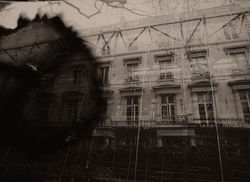 |  |  |
 |  |  |
 |  |  |
 |  |  |
 |  |  |
 |  |  |
type
| |
|---|---|
| |
| |
P R O C E S S L O G & A N N O T A T I O N :
| | |
|---|---|---|
| | |
| | |
| | |
| | |
| | |
| |
| | |
|---|---|---|
| | |
| | |
| | |
| | |
| | |
| | |
| | |
|