


metamorphosis
In this video I see a different, more painful, style of double exposure where thorns are seen coming out of the persons back almost into a nest.
I also see that the double exposing has been converting into a GIF where the thorns are slowly coming out the back in what seems like an excruciating pain. The words I would use to describe this photograph would be distorted, excruciating and traumatizing, other more formal and sophisticated words would be agonizing, mortifying and warped. In the picture / video, I see these lines in a picture as something abnormal, as it is something peculiar that you do not see in your everyday life. This photograph shows a new style of double exposing but, instead of something being tatted onto your arm it seems as if sharp sticks are coming out of your back in a very painful pain. If I take a closer look into the metamorphosis, I come to conclusion that it is made from a GIF, giving this blood curling look to it, almost as if the sticks are coming out from the persons back. If I had to describe this work to a person that could not see it, in my own words, I would explain to the person that the work, is not any ordinary work, but it is a painful and distorted way of double exposing sticks, to an extent that it seems like the sticks are ripping through the persons skin, giving a new complex way of double exposing the composition together. The persons style in this pictures, is an abnormal pose where the model is all curled up in to a ball, almost as if its soul was taken away from him, dehumanizing the model.
This photograph reminds me of, the Artist Christoffer Relander, as both of the artist work are made in a black and white developments, with pictures of natures and trees, which is going to help me more to succeed in this artist page as I will be using my own personal experience and try make it even better than last Time. Things that I notice in this video would be how the models poses are more painful look than Christoffer Relander where the model seemed less tense. I recognize many things in this video, on how the model has been dehumanized, with the sticks being curled up, whilst growing out of the models back, like a nest. I also recognize that the videographer, made it seem as if the model once bein dehumanized is ended up turning into a deer, giving a strange composition. Things that would seem new to me, would be that my last developments, the stick / nature was all focused inside the core of my body, whilst this new concept made me inspired to be making trees poke out of my back, expanding my knowledge and style on how to double expose. This video is related the the last artist page, as they both include, double exposing in black and white edits, with the image being double exposed with the portrait photographs would be all on the same concept of nature, as Metamorphosis includes me doing tree branches pictures, which is related to nature, whilst my other artist page (Christoffer Relander) tells me to take pictures of the nature (mountains, trees, rocks and landscapes). And for the differences for both of these types of work, would be that, the metamorphosis side would be that the developments, are very distorted and blood curling , whilst my Christoffer Relander side would be that the developments, are very calm and tranquil edits. These developments of metamorphosis are very different to the real life world, due to if someone saw the video in real life they must be terrorized, as the artwork can never be seen in todays society, which is my key inspiration to aim to do throughout my whole artist page. What interests me most about this work would be, that the way the tree branches are coming out of the persons back, makes it look abnormal, which is my aim to do using GIF's, to give that look that my work is being experimented in various of different ways.
When I look at this style of work, it gives me that sensation as if the models body if being portrayed as further away whilst the sticks, sticking out of the models back, seems as if it is coming at you, making the person watching this picture feel as if the sticks are contagious, due to the 3D effects. The colors in this photograph is made in a black and white style, making it easier for me, as I already have personal experience making black and white developments with my last artist. The colors most frequently used would be black, as the image is a very, dark and contrasted image, keeping it related to metamorphosis, as metamorphosis is not seen in a bright way. What makes this photograph look crowded, would be the background is very compacted, with leaves sparse along the floor and with the natures ground would be very overgrown, but mainly the horns being pulled out from the persons back gives that feeling that it has been spread along the whole side of the image. the person in this photograph seems almost as if he is in a unimaginable pain, due to his actions in the past, and what he did had lead him to serious and painful consequences. Just from this image, this person seems that it has lived a criminal yet sneaky life, but then after due to all his actions he has paid the consequences. I came to this idea mainly because the video has made the model seem as if he did something he should not have done, and then the victim put a curse on him, making the image look even more painful.

contact sheet


For my first contact sheet photoshoot on my metamorphosis page. My most successful photos were circled in red, meaning I was going to use that exact portrait or nature picture and go into further composition, where I would edit the two together, but having to change some things including black and white, brightness and contrast. These portrait photographs were taken at the models house, in the living room, as that was the only place with a large enough white surface, and used the natural lighting, with the living room lighting as well just so then it would give more of a spotlight for the model. I decided to different styles of poses, where it would seem to someone that the poses are portrayed as abnormal and with the style of the poses it seems as if there was a excruciating pain in the models back, to keep my work theme related to the style of identity. For the nature pictures, I took them around my area, with the sky being as the background, so then it would be easier to double expose the tree making it look like the background is completely vanished white, giving a different composition to my work. For all my photos, I did the camera angle close up, to where it would cut out any excess of background out and have either the tree or the models portrait as the core of the image. For my next photoshoot, I aim to do the nature photographs with a complete bright blue background, so it will be more simple for me to do the editing, of the background completely white, and also to take pictures of trees with more compacted branches, to give that final outcome the composition to do my work in the style of metamorphosis.
metamorphosis idea developments - portraits


for my 1st portrait developments, the outcome was all the images being black and white, linking back with the style of metamorphosis. These images were also done using a similar double exposing technique, to where it would give that distorted affect that tree branches were slowly poking out of the persons back or stomach. The nature picture of the tree branches, depicts them being atlas, making the concept based on metamorphosis, where the model is slowly changing from a human to a deer. The model did different style of poses per edit, where some of them were making look as if the model was in excruciating pain, not from the facial expression, but the body pose, giving the idea of experimenting into further composition, whilst having my work link back to the videographer. The pictures were taken with a white background with harsh spotlight shining directly onto the models body, evening the body contrasting together and also to make the two images blend in better. The key aspects of my first developments would be, how much lighting I used (natural lighting, lightbox and the room lighting) and not overdone my work by adding to much lighting into the photograph.
metamorphosis idea further developments


for my 1st further developments, I kept all the images in Black and White to keep my theme related to my videographer. I decided to experiment by mirroring the pictures on top of each other giving a weird effect. The pictures, once were mirrored together went a little bit dark, as if the brightness was lowered as well as contrast, so I refined the work by increasing brightness making the background go completely white. The key aspects for my work would be how the mirroring technique was not kept the same, but it was experimented in various ways, showing in a greater depth of expanding my experience with the style.
exploring with ideas of metamorphosis - gif
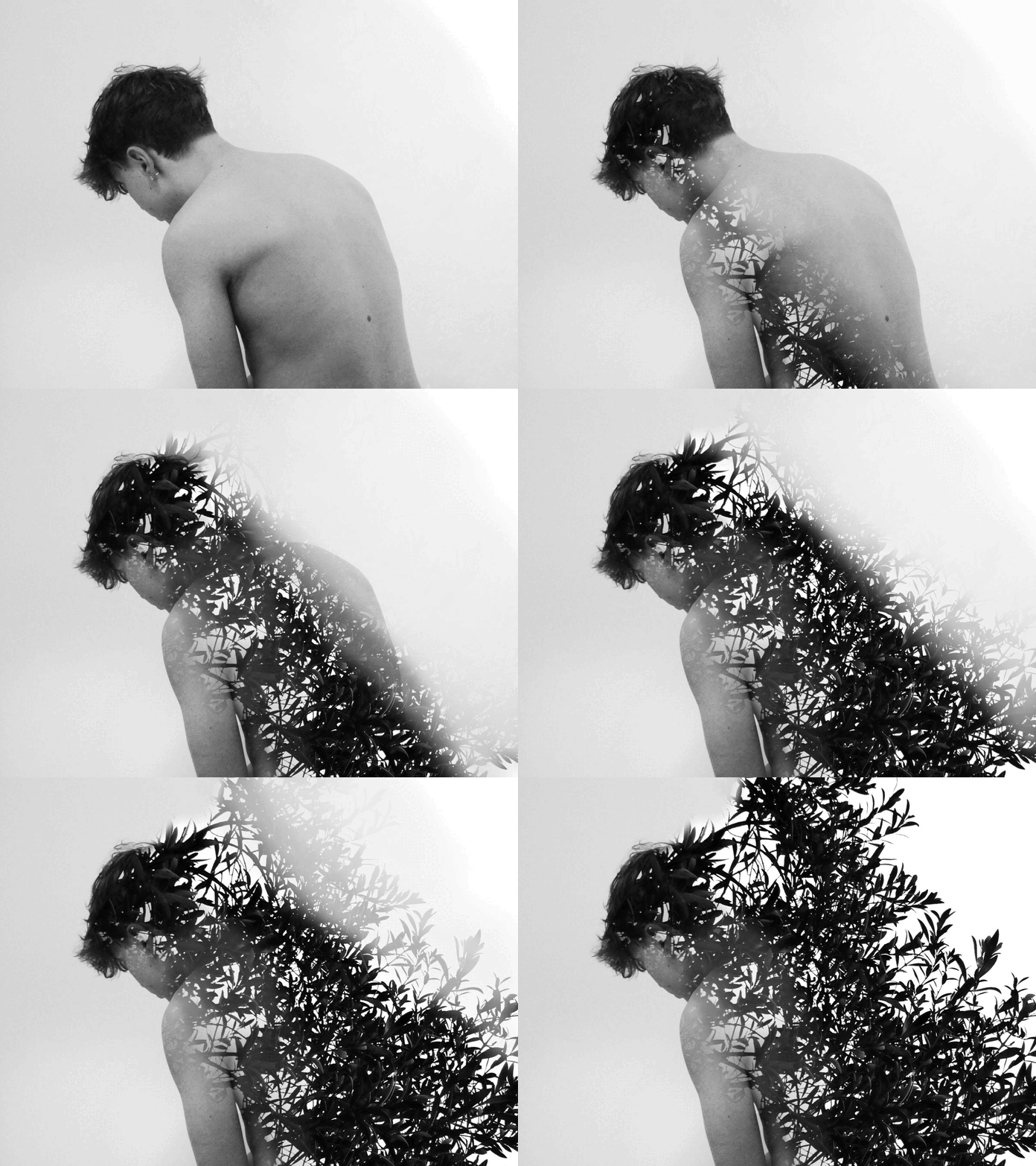
For my first development, I decided to this different type of further experimenting as my videographer did their work by doing a slowly animated GIF making it seem as if the tree branches were growing, which was my key aim to do in my GIF. I did the Gif by erasing the branches slowly until it was only the model left, after that I saved the all of the slides by pressing control z saving one as I go, then uploaded the on the GIF maker website and saved it to where it looks like a Gif, I did this as the style was the most related to my videographer. On my next Gif, my aim is for the branches to decade so it looks as if the trees grows out then curls back in.
contact sheet re-draft


For my photoshoot re-draft, I decided to take the photos of the models body, in a way the camera angle would make the pose seem even more abnormal. the portrait photographs were taken on a Panasonic DC-FZ82 camera, which is more of the new updated cameras with different features. The f-stop was taken on a f/8, meaning the photographs would be more dark as the aperture is quite closed, meaning less light is entering the camera, the purpose of this was for the pictures to turn out more gloomy, giving that really metamorphosis effect. The camera angle was taken from the eye point of view of the photographer, making the models photos more detailed as the camera will be mainly focused on the body, the purpose of doing this is so it will give me more of a platform to be editing the portrait and the nature pictures together. The photos were taken with natural lighting as well as the living room lighting which was placed in a way it made it seem as if it gave a spotlight to the models back, the camera flash was turned off as it would have caused to much hash lighting, giving that refinement to the portrait photographs. furthermore, the nature photographs were taken of tree branches, in a way that it seems the trees look is sticking out, with the branches overlapping each other. The nature pictures were shot on a Panasonic DC-FZ82 camera, the same camera that was used to take photos of portraits. The f-stop was taken on a f/5.6, making the picture even more darker, juxtaposing the tree branches from the crystal clear background. I did these pictures on a very sunny day where there was cloud and all was blue, so it is more simple to make the background of the picture, when I am editing, completely white, but also so it makes the tree branches stick out more. The camera angle of these photographs were taken from a low aspect so it would have the sky and not the housing in the background, I did this to keep the theme on the same style as the videographer.
process log

step 1 : open one of the pictures circled in red, on the contact sheet, on Abode Photoshop 2016 version.
step 2 : change the image to black and white, and increase or lower the colours contrast on what suits the picture best.


step 3 : press the brightness and contrast logo, to an extent where the background has gone completely white, but increase the brightness a little bit, not too much, as the models body will become blurry and really harsh lighting will ruin the edit. Then increase the contrast where it gives a stronger outline to the models body, and even out the contrasting with the whole body.
step 4 : press the curve logo, and lower the curve, to where the white background juxtaposes from the models body, giving that finish to it and still keeping the edit related to the whole artistry theme.


step 5 : open up of the nature picture, that has been circled in red on the contact sheet, on Abode Photoshop 2016 version.
step 6 : change the image to black and white, and the aim is for changing the colour contrast to an extent that the background has gone completely white with the tree branches standing out.


step 7 : copy and paste the nature picture onto the models portrait edit, and move it to where the trees reach to the end of the image, to where it will give that effect the branches are growing out the persons back.
step 8 : Finally, erase the edges of the tree smoothly, so it makes the tree look like its growing out the models back even more painfully, keeping the concept related to my artists work.

re-draft development edits in the style of metamorphosis


What I did for my 1st further development, was keep my work black and white mainly because last time doing them black and white was a great success. I also kept the models body in the middle of the frame, which was an improvement from last time, as last time my models body was all over the place. I decided to explore into further detail where I did three developments of the models head, changing the aspect of identity, whilst keeping it related to my videographer. I kept the same camera angle (persons eye point of view) as my last photoshoot, due to that being the key aspect of my developments. For every development in this photoshoot you can see, the experimentation of changing the models pose per development, refining my work from last shoot. I decided to use the same lighting as last time due to that being a great success on my shoot. I used similar techniques as my videographer, where the model poses have an abnormal style which is related to the theme of unimaginable pain. My key aspects are the pictures of the models body, all turned out to be in the centre of the developments, which is one of the key refinements in this photoshoot compared to last one.
re-draft further development edits in the style of metamorphosis


What I did for my re-draft further developments was different styles of mirroring, I refined my work from last time, due to being more creative with my mirroring / overlaying the two same images together. My aim for these edits, were to make them confusing, whilst still being clear it is related to the metamorphosis style. For some of the edits due to me mixing them together I came to realisation, they were too dark, so I increased the brightness to where the white bright background became juxtaposed with the contrasted body. The key aspects of the photoshoot would be I managed to maintain the developments similar to the ones before.
metamorphosis highlighting success


For the end of this artist page, I decided to pick out three of the best developments from each developments I did. Giving a conclusion of my work at the end of the page to finish of the page. The reason why I picked them was due to them being my personal favourites, but mainly due to the work being closely related to my videographer work, which is mainly the poses and style of the model as well as how closely and precise the nature picture has been double exposed.