
Identity

Maja Topcagic
Artist Analysis

Maja Topcagic is a really impressive self-taught photographer born in Bihac, Bosnia and Herzegovina. At the moment she is based in Sarejevo as a freelance photographer and retoucher. Photography used to be only a hobby for Maja Topcagic but later it turned into a professional job and one of the most important things in Maja’s life.
Maja Topcagic is a completely self-taught photographer with over 5 years of experience. She never took any classes and learnt everything by herself. Now she knows quite a lot about photography and different skills that help her to create really impressive photoshoots. However, Maja thinks that she is able to improve her work and gain useful knowledge. She knows that this will help her to improve her skills in editing and capturing photographs even more.
At the beginning, Maja Topcagic captured images with her phone and later edited them using photoshop. At the age of 19 Maja was given her first digital camera and right after that she started taking her first photographs. And, as I already said, photography turned from hobby to an actual job for Maja Topcagic.
This photographer is really famous now and she already had her photos published on multiplicity of different book covers all around the world, exhibitions, magazine editorials and digital exhibitions. Her photographs were published as covers on well-known photography magazines worldwide. This includes such magazines as EOS Magazine, Digital Photo UK, Photography Week, Popular Photography, Good Light Magazine, Digital Camera China etc.
Just like Elena Kulikova and Claire Luxton’s artworks, Maja Topcagic’s photographs link to the idea of Identity. This is the result of following several basic concepts in her photoshoots all the time. For example, one of them is
that she always captures people. This suggests that Maja Topcagic is a portrait photographer.
This photographer also shoots mainly women. In one of the interviews Maja explained her view
on female models saying : “I love female models because of their sensibility and tenderness.
Women always fit to everything I want to show on photographs”. So looking through her portfolio
we can conclude that she bases on portrait photography (primarily of women).
This photographer captures her images using digital camera. This makes the process of editing
much easier. Also, the photographs are really clear. They are not grainy and blurry. This is one of
the several ways how Maja captures good-quality images. The other way to approach this is using
natural lighting in combination with a portable silver aluminium reflector. This helps to create
vivid images with bright but natural colors.
When we look at Maja Topcagic’s portfolio we can notice that all of her photographs are really
interesting. When the interviewer asked the photographer what inspires her she said: “I find
inspiration everywhere I go, or just by passing down the street. I imagine moments frozen and captured by camera. Also, I write down my dreams. Sometimes an idea bumps me in the head, but mostly I find inspiration looking at the world through my eyes. It’s often something interesting, weird and extraordinary. My work is inspired by movies, books, music, videos, ordinary people and conversations too”. From her answer we can learn that Maja is a really artistic-minded person. Such ordinary things as walking down the street inspire the photographer and help her to create wonderful photoshoots! She uses a lot of different media to create her photoshoots. For example, she uses a lot of plants, flowers and even insects. Sometimes the photographer even captures images under the water! All these makes her images inimitable and really interesting.

Photoshoot Plan


To create my photoshoot in the style of Maja Topcagic we will need to focus on some basic concepts and then follow them. This will help us to capture photographs really similar to Maja's style. For example, we need to use natural lighting and a lot of interesting media. In this photoshoot I will focus on capturing images under the water. In my opinion, this will make my photoshoot really impressive and interesting. I will use different bath bombs to make the water colorful so my photographs will look bright and vivid. I will also try to use flowers and plants. All this media link to the style of Maja Topcagic and will make my photos look really similar to the images from Maja's portfolio.
Concepts
1. Lighting
For my firts photoshoot in the style of Maja Topcagic I will use natural lighting. This will make my images look really interesting.
2. Camera angle
If we look through Maja Topcagic portfolio we can notice that she is capturing her images from different angles. This suggests that we can use any of these camera angles: the bird's-eye view, eye level or low angle. But we also need to consider that Maja is a portrait photographer. This means that we will need to capture the majority of the photographs from the bird's-eye view.
3. Shot length
To capture images inspired by Maja Topcagic works we can use any of these framings: long shot, medium shot, close-up or extreme close-up. But I think that it's much better to use medium shot for capturing photographs.
4. Media
To create an exciting photoshoot we can use a lot of interesting media. For example, we can use water, colorful bath bombs, plants and flowers, glitter and many other things.
5. Models
Just like Maja Topcagic, I will shoot only female models. This will link to her works and also to the idea of Identity.
Photoshoot
Images Captured With An Iphone 11 Camera:


Images Captured With A Nikon Camera:


Hand Photography:


Contact Sheets


To choose the most successful images I created several contact sheets that will help me to do that. Later, I will circle the best images and cross the worst ones. To make this process even easier I can annotate some unsuccessful images. For example, you can say that the photograph is blurry. You can see an example of annotated images if you take a quick look at "IMG_3547.JPG" and "IMG_3561.JPG" on my first contact sheet. You can also say that some photographs are underexposed or overexposed. To create my photoshoot in the style of Maja Topcagic I used artificial lighting as well as natural lighting. These experiments with the lighting helped me to avoid capturing a lot of under- and
overexposed images. You can also annotate some images as captured from the wrong angle. Unfortunately, I don't have an example on my contact sheet for this photoshoot but if you take a look on my previous photoshoots you might find some.
Developments
To edit my photographs I only changed the colors, the contrast and the brightness of my images. To do this I used a tool called "Hue/Saturation" and another tool called "Brightness&Contrast" on photoshop. I also fixed some edits by erasing several areas of the layer that I just created with the tool "Hue/Saturation". To do this I used other tools called an "Eraser" and a "Healing tool". These helped me to create more realistic images even if the colors were bright and vibrant.


Redraft Photoshoot
My redraft photoshoot was inspired my Maja Topcagic's series of photographs called "Milk bath". To create this photoshoot I decided to pour some milk in the bath and then put some flowers in the water. These things helped me to create an interesting atmosphere really similar to my artist. In my opinion, white water highlights all the features of the model's face. The idea of milky-white water is that its color is not distracting. On the opposite, you can notice how beautiful the flowers are and how charming the model is.


Contact Sheets For The Redraft


Here you can see several contact sheets for my redraft photoshoot in the style of Maja Topcagic. This photoshoot was inspired my Maja's series of photographs called "Milk Bath". To create this photoshoot I used some plants and flowers. This made my images more interesting. To make the water cloudy-white I decided to use milk.
To avoid capturing overexposed and underexposed images I experimented with the lighting. I used artificial lighting as well as natural. I also tried to capture images in the dark with a flashlight. These types of lighting made my images clear and not grainy. They also made my images bright and vibrant. All these techniques helped me to create an exciting photoshoot inspired by my chosen photographer Maja Topcagic.
Later I will edit my images using a lot of interesting techniques. For example, I can change the color of the water of the flowers with the tool "Hue/Saturation". I can also use such technique as double exposure for my further developments.
Redraft Developments
As you can see I decided not to edit my photographs a lot. All I did was the following: I increased the contrast and used the tool "Hue/Saturation" to make the colors more vivid. I also used "Healing" tool quite a lot. This helped me to reduce the amount of skin irregularities and to make it look more groomed. I also used the healing to get rid of unwanted leaves of flowers in the water. All these techniques made my edits look much more pleasing.


Double Exposure
To create my further developments, I decided to experiment with double exposure. To do this I layered one image on another. I decreased the opacity and moved the second layer a bit. This helped me to create the 3D effect. I think that this interesting technique made my images much more exciting.


Process
To show the process of editing my images in the style of Maja Topcagic I made took screenshots. On the first screenshot you can see one of my first developments. Here I decided to change the color of the water using the tool "Hue/Saturation". After that, I erased some areas of the new layer to make my image look more real.

On the second screenshot you can see the process of editing one of my further developments. Here I decided to use such technique as double exposure. When I pasted the base layer for the second time, I decreased the opacity and then moved it to the side. I also changed the color of the base layer with the tool "Hue/Saturation". This helped me to create really interesting developments.

Highlighting Success
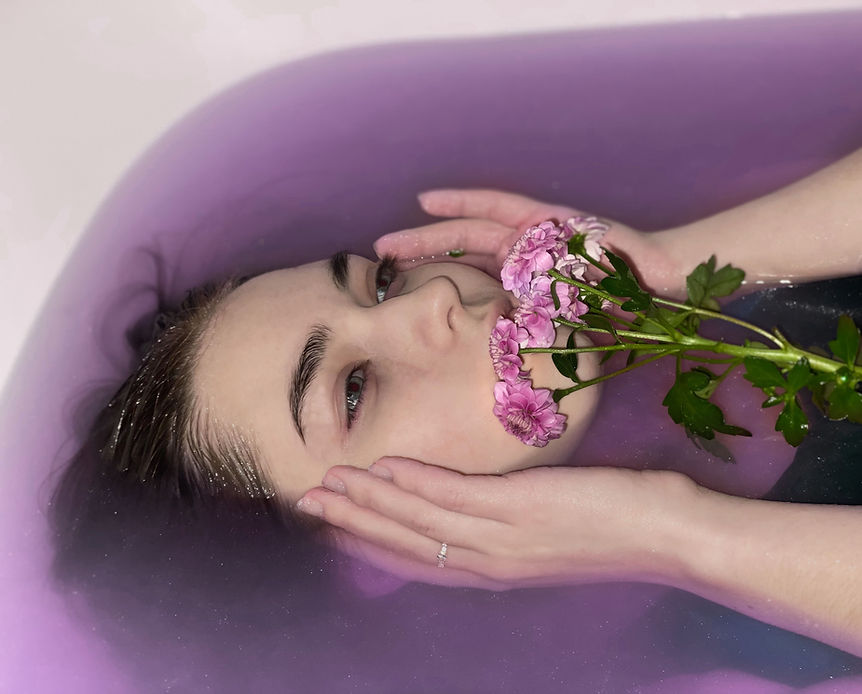
To end up, I would like to present you the most successful image from my photoshoot in the style of Maja Topcagic. I believe that this development is the best out of two photoshoots because here you can clearly see all of the concepts related to my chosen photographer. For example, here I used flowers to show the correlation between the model and the nature. The color of the water is almost the same as the flowers. In my opinion, this makes my image even more charming and mysterious. However, to create this atmosphere I also used a technique called "Vibrancy" and "Hue/Saturation" on Photoshop. As you can see, I changed the color of the flowers a bit and also decreased the brightness of my image. This helped me to create this delightful lilac color. I believe that this color also helped me to show the fragility of human nature.
Creating GIFs
To expand my portfolio I decided to create a series of GIFs. To create those I chose one of the most successful 3D developments from my Maja Topcagic photoshoot. After that I opened them on Photoshop I started to save it as a new file every time I changed the hue. To do that I used the tool "Hue/Saturation" on Photoshop. After that I went on the website called "gifmaker.me". I uploaded those images and created GIFs. I also changed the speed of the animation to make it more smooth.


Additional Photoshoot
To develop my portfolio and make it more interesting I decided to capture an additional photoshoot. I printed some of my images from the redraft photoshoot and put them under the clear glass dish full of water. I also put some of the images into the plastic file and put some water on it. This helped me to create really interesting images. I also created bubbles and ripples on the water surface.


Contact Sheets


Now You can see that I created several contact sheets for my additional photoshoot in the style of Maja Topcagic. To create this photoshoot I printed some of my images from the redraft photoshoot and recaptured them under the water.
I put the images under the glass dish which was full of water and created some bubbles and ripples on the water surface. This made my images look smudged and more unusual. I also put the printed images in the plastic file and sprayed some water on it. This helped me to keep the images safe.
Unfortunately, when I recaptured my images under the water some of the photographs came out blurry. This is because sometimes the camera doesn't have enough time to focus on the image.
Developments
To edit my images I decided to use a tool called "Color Balance" on Photoshop. This tool reduces the brightness of some colors and increases the brightness of others. This tool helped me to create interesting shades and colors, created the atmosphere of peace. This tool also made the image less bright vibrant, made it softer, pastel. I also used a sharpen tool so my images are not so blurry. After that I also used the tool called "Brightness & Contrast". This helped me to fix the lightning in the overexposed and underexposed images.


3D Edits
Before, I already experimented with the technique called double exposure. I mirrored images, added the texture and made some other developments using this technique. However, I also tried to create some 3D images. You can find them on my "Elena Kulikova" page and on this page (Maja Topcagic). To create those I opened the images on the photoshop, copied the base layer and pasted it again. After that I changed the position of the second layer. Then I changed the blending mode to "Multiply" and changed the opacity to 80%.
I believe that this technique relates to the idea of Human Identity. Portrait photography shows how different and individual all the people are. This also shows their natural beauty. In my opinion, double exposure does not only help me to create these exciting developments but and also reveals all those features of the model's face.


