
UNIT 2 - IDENTITY
shirin neshat

SHIRIN NESHATIS IS AN IRANIAN VISUAL ARTIST WHO LIVES IN NEW YORK CITY, KNOWN for her
her work in film, video and photography. her work focuses on the differences between Islam and the west, femininity and masculinity, public and private life, antiquity and modernity, and the bridging of these themes' places.
since Iran has undermined basic human rights, particularly since the Islamic revelation she has said that she has "gravitated toward making art that is concerned with tyranny, dictatorship, oppression and political injustice. Although I don’t consider myself an activist, I believe my art – regardless of its nature – is an expression of protest, a cry for humanity.”
neshat has been recognised for winning the international award of the XLVIII Venice biennale in 1999, and the silver lion as the best director at the 66th Venice film festival in 2009, to being named artist of the decade by Huffington post critic g. roger denson. neshat is a critic in the photography department at the Yale school of art.
early life and education
neshat is the fourth of five children raised in a "very loving, supportive Muslim family atmosphere" in the scared city of Qazvin in north-western grandparents. neshats father was a doctor, while her mother was a housewife. according to neshat, her father "fantasied about, idealized, and gradually discarded all his own ideals, as did both of her parents. what occurred , I believed, was that their identity faded over time, and they traded it for comfort. it was beneficial to their class"..
at Tehran, neshat was enrolled in a catholic boarding school. her father pushed each of his daughters to "be an individual, to take chances, to study, to explore 5the world," according to neshat. he sent both his daughters and sons to college to further their education.
neshat fled Iran in 1975 to study art at uc Berkeley, where she eared her ba, ma, and mfa. in 1983, neshat graduated from uc Berkeley and relocated to new York city. she rapidly reconsidered that doing art would not be her career choice at the time. she spent ten year of her life working with her future husband, who headed the storefront for art and architecture, an alternative environment in Manhattan, after meeting him there.
neshat made a few attempts at making art during this time , but they were all destroyed. she was scared by the new York art world, and she thought her work was unimportant. "I created almost no work over those 10 years," she says, "and the art I did do was unhappy and finally destroyed".
neshat was exposed to innovators- painters, architects, and philosophers-since the storefront functioned as a cultural laboratory; she claims storefront helped spark her passion for art. nesaht resumed serious artistic endeavors In 1993, begging with photography.
I selected this photographer because I connect to her and I love the way she represents Islam. I find it so interesting how she double exposes her images and somehow makes it look like a clear image.
HER WORK


PHOTOSHOOT 1


for my contact sheets I circled the images that I wanted to edit and change and crosses on the ones that i thought weren't good enough or that were blurry or the model was moving too much. FOR THE PURPOSE OF MY PHOTO SHOOT I SCRAWLED A LOVELY MESSAGE ON MY MODELS FACE THAT SAID 'I AM BEAUTIFUL' AND PHOTOGRAPHED THAT SIDE OF HER FACE . TO IMATATE MY ARTIST/PHOTOGRAPHER SHIRIN NESHAT, I CREATED THIS STATEMENT IN PERSIAN ARABIC. for this photoshoot I used a light box to brighten the face and I used a white background SO THE FOCUS COULD BE ON HER FACE AND THE MESSAGE BEING SENT. I Think this was a success however, FOR MY NEXT PHOTOSHOOT I WILL TAKE MORE PHOTOS AND USE OTHER PARTS OF THE BODY LIKE MY ARTIST DOES. FOR EXAMPLE THE MODELS EYES AND HANDS.
PROCESS LOG
 |  |  |
|---|
step 1: my first step to editing these images was to make them all black and white. so they can look more like my photographers work.
step 2: my second step was to Increase THE BRIGHTENESS UP TO 10 AND PUT CONTRAST UP TO 30 WHEN EDITING THIS IMAGE.
STEP 3: MY THIRD STEP TO EDITING THIS IMAGE IT TO USE THE CROPING TOOL TO MAKE A FRAME FOR THR PHOTO.
Further Developments - exploring composition


I began by selecting the photographers that best suited my photographer. for this photoshoot I converted my shoots to black and white, then improved the contrast and brightness. then I used the crop tool to darken the backdrop a little to let the Persian calligraphy on her face stand out. these innovations, in my opinion, were a success. however, for my next photoshoot, I'll photograph not just the model's face but also the model's hands and eyes.


PHOTOSHOOT 2


for my second contact sheet I circled the photographs I would like to develop an crossed out the one's that didn't fit my photoshoot or were too blurry. for this photoshoot I used a different model and I took pictures in various places AND TOOK PICTURES OF DIFFERENT PARTS OF THE MODELS BODY [ EYES, HANDS ] INSTEAD OF JUST USING HER FACE. I USED A BLACK BACKGROUND THIS TIME AND USED NATRAUL LIGHT BECAUSE I WASNT IN THE CLASSROOM. I THINK THIS WAS A SUCCESFULL PHOTOSHOOT and I think I reached my target from my last photoshoot to explore the models body more and experiment with different positions.
PROCCESS LOG
 |  | 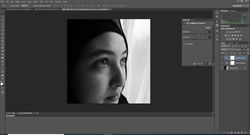 |
|---|---|---|
 |
STEP 1: THE FIRST THING THAT I DID TO EDIT THIS IMAGE WAS TO CROP MY PHOTO TO THE SIZE IM HAPPY WITH AND THAT FIT TO LOOK MORE LIKE SHIRIN NESHATS WORK.
STEP 2: TYHE NEXT THING I DID WAS MAKE THE IMAGE BLACK AND WHITE
STEP 3: THEN I PUT THE BRIGHTNESS UP TO 23 AND PUT THE CONRAST UP TO 40
STEP 4: THE LAST YHING I DID TO MAKE THE PHOTOGRAPH BETTER WAS ADD A WHITE FRAME USING THE CROP TOOL
DEVELOPMENT 2
'I am beautiful and I love the way I look'
'there is more to me then my face'
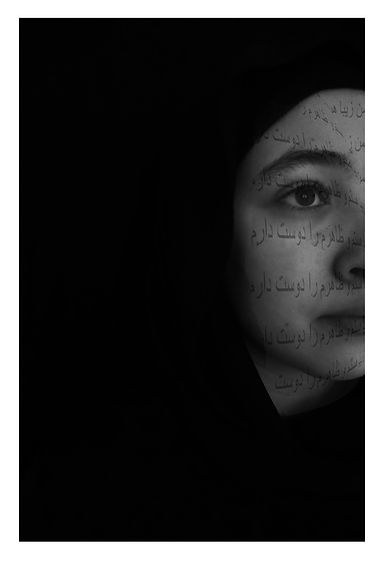


for these developments I cropped my images to the size I want then I made my photos black and white. after that I added the brightness a little and increased the contrast. for my third step I used the curve tool to darken the backdrop. then I copied and pasted some Persian writing
{"I am beautiful and I love the way I look", "there is more to me than my face"} on the edited image. then I image blended the two together to make one image inspired by shirin neshat. the next thing I did was to use the curve tool to darken the models face because when I imaged blended it made the models face to bright. the final thing i did was to make a white boarder using the crop tool. I think this piece was a success


BLACK AND WHITE DEVELOPMENT


for these black and white developments all I did was make the images black and white then made the images brighter and inharnsed the contrast. then I used the curve tool to darken the background to make the models face stand out. after that I made a border for the photographs with the crop tool to present it nicely. overall I think this photoshoot was a success because it matched the theme of my photographer shirin neshat.

black and white


my Arabic writing


developments 3
for these developments I used the Arabic writing I wrote down on a piece of card and image blended them with my images. then I made my images black and white to replicate shirin neshat's work more. then I used the curve tool to darken the whole image so we can see the models face more clearly and not just the Arabic writing. I then drew with the burn tool around the images to make the background darker.


PHOTOSHOOT 3


for this photoshoot I split it into two parts. the first one was taking pictures of her hands on her face and her hands on her own without any Arabic writing. in my second shoot I did some Arabic calligraphy and different patterns on my models hands. then I used a pipette to help me poured water on my models hands whilst taking the pictures so it can represent how me a Muslim girl in a Christian populated country and how I feel LIKE sometimes I don't belong and still linking it to my photographer shirin neshat. Then I told my model to present her hand as if it weighd nothing so it could give the photograph a good look.
BLACK AND WHITE DEVELOPMENT 3


for these simple black and white edits I made them black and white first then put the contrast up to 15 and brighten the image a little so when i used the curve tool the face would not turn darker and standout. added to the curve to darken the backdrop. then I drew with the burn tool to make the background darker and make the faces standout more.
DEVELOPMENTS 4


these edits are from part two of the photoshoot where my model had Arabic writing in her hands. first of all I made all my images that I took of her black and white and added some color to it. then I added a bit of contrast and brightened the image a bit so her face can standout when I darken the image later on. then I drew with the burn tool across the whole image to give it a better look and finally I darkened the images a little bit just to darken the background till it is black.
EXPERIMENTING WITH MIRORRING


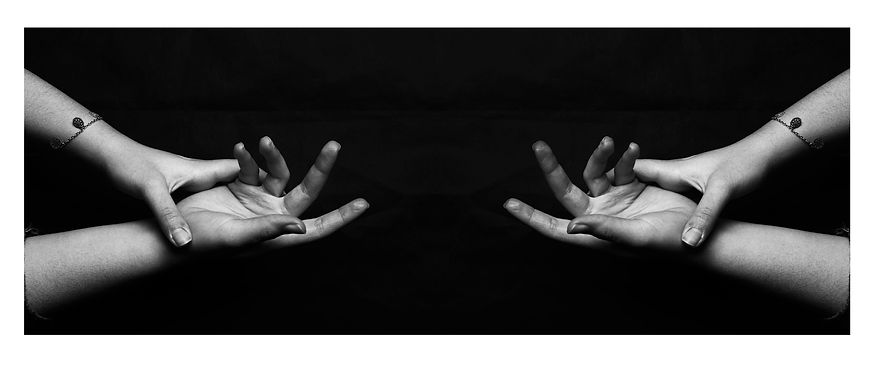
I further developed my images by mirroring them. my first step was to copy and paste the image then increased the canvas size with the crop tool the same size as the image and then pressed control to help me mirror the image to the other side of the canvas.